How to Cancel ChatGPT Subscription in 2026: The Ultimate Guide
The artificial intelligence landscape has changed significantly in 2026. Advanced models like GPT-5 and video tools like Sora have attracted millions of users to OpenAI’s premium plans. However, due to competitors such as Claude 4.5 and Gemini 2.0, many users are looking to manage their digital expenses.
This guide explores how to cancel ChatGPT subscription to avoid data loss or accidental charges. It covers every platform, troubleshooting tips, and alternatives.
1. Understanding the 2026 Subscription Economy
It is important to understand the state of AI subscriptions in 2026. Most AI services use a “Prosumer” model. While OpenAI offers value, the monthly fee adds up.
The OpenAI Billing Policy
When ending a membership, keep these rules in mind:
- No Partial Refunds: OpenAI does not prorate bills.
- Access Retention: “Plus” or “Pro” features remain active until the end of the billing period.
- Data Portability: Chat history is not deleted. Users simply revert to the “Free” tier.
2. How to Cancel ChatGPT Subscription on Web (Desktop/PC)
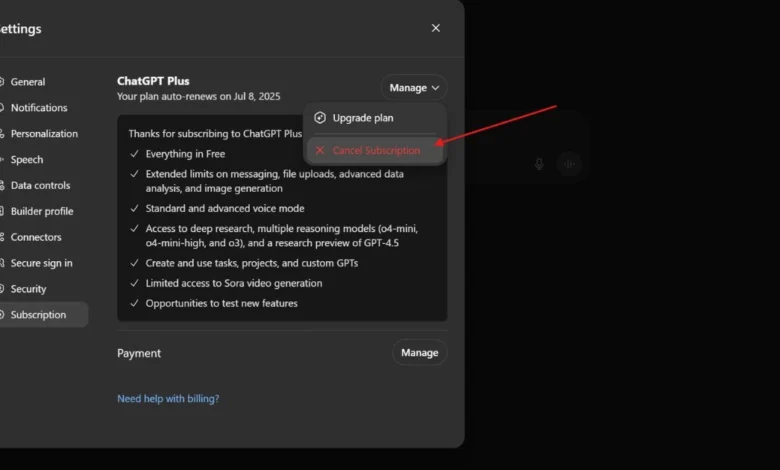
This method applies if you signed up through a browser (Chrome, Safari, or Edge) using a credit card or Stripe. If you are wondering how to cancel ChatGPT subscription on your computer, the process is handled through a secure billing portal.
Step 1: Account Authentication
Log in to chatgpt.com. Ensure the correct account with the active subscription is used.
Step 2: Navigating the 2026 UI
Look at the bottom-left corner of the screen. Click on your Profile Name/Avatar. A pop-up menu will appear.
Step 3: Accessing “My Plan”
Click on “My Plan” or “Settings.” This section displays the current tier (Plus, Team, or Enterprise).
Step 4: The Stripe Billing Portal
Click on “Manage my subscription.” This redirects to the Stripe billing dashboard. Stripe handles all of OpenAI’s web-based transactions.
Step 5: Finalizing the Cancellation
On the Stripe page, the payment method and billing history are displayed. Click the button labeled “Cancel Plan.” Feedback may be requested. Once confirmed, the status changes to “Canceled,” but access remains active until the end of the cycle.
3. How to Cancel ChatGPT Plus on iPhone (iOS/Apple)
If you subscribed via the iOS app, Apple handles all billing. Many users get confused when they try to learn how to cancel ChatGPT subscription on mobile because the option is hidden within the iPhone’s system settings rather than the app itself.
The Step-by-Step Apple Process:
- Settings App: Open the Settings app.
- Apple ID: Tap Name/Apple ID.
- Subscriptions: Tap the “Subscriptions” tab.
- Locate OpenAI: Find ChatGPT.
- Terminate: Tap “Cancel Subscription.” Confirmation with FaceID or a passcode is required.
4. How to Cancel ChatGPT Subscription on Android (Google Play)
For Android users who used the Google Play billing system, the process is managed through the Play Store. Learning how to cancel ChatGPT subscription on Android requires you to navigate Google’s payment center.
The Android Process:
- Google Play Store: Open the Play Store app.
- Profile Menu: Tap the Profile Icon (top right).
- Payments & Subscriptions: Go to “Payments & subscriptions” > “Subscriptions.”
- Manage ChatGPT: Tap the ChatGPT icon.
- Cancel: Tap “Cancel subscription.” Google may offer a “Pause” option. To stop paying, select Confirm Cancellation.
5. Troubleshooting: Why Can’t I Cancel?
Troubleshooting billing issues in 2026 is more complex due to cross-platform ecosystems.
Problem: “The Cancel Button is Missing”
This usually happens because of a Platform Mismatch. If you paid via iPhone, the “Cancel” button won’t exist on the website. To fix this, users must go back to the device where the subscription started to find out how to cancel ChatGPT subscription correctly.
Problem: “Enterprise/Team Account Issues”
For ChatGPT Team accounts, there is no personal cancel button. Contact the Workspace Admin. Admins must go to the Admin Console to cancel the entire team’s seats.
6. Alternatives to ChatGPT in 2026
The market offers incredible alternatives if you feel the $20/month fee is no longer worth it:
- Claude 4 (Anthropic): Preferred for long-form research and creative writing.
- Gemini 2.0 (Google): Perfect for users deep in the Google Docs and Gmail ecosystem.
- Perplexity AI: The best choice for real-time news and cited research.
7. Preparing for Post-Plus Life: What Happens Next?
After you complete the steps for how to cancel ChatGPT subscription, the account reverts to the Free Tier. Changes include:
- Lower Priority: Longer wait times during peak hours.
- Model Access: Loss of access to high-end image generation.
- Data Limits: Restricted file upload capabilities.
8. (FAQs)
Q1: Can I get a refund if I forget to cancel?
OpenAI typically denies refund requests once the billing cycle has started. However, under the EU AI Act, a “Cooling Off” period may apply.
Q2: Will my API key still work?
Yes. ChatGPT Plus (the UI) and the OpenAI API are separate billing systems.
Q3: Is it difficult to stop the auto-renewal?
No. Once you follow the guide on how to cancel ChatGPT subscription, all future recurring charges are stopped instantly.
Conclusion
Managing AI tools should be easy. Knowing how to cancel ChatGPT subscription properly saves time and money. Check which platform was used to sign up (Web, Apple, or Google) and cancel at least 48 hours before the renewal date to ensure you aren’t billed for an extra month.