How to Cancel ChatGPT Subscription: Step-by-Step Guide
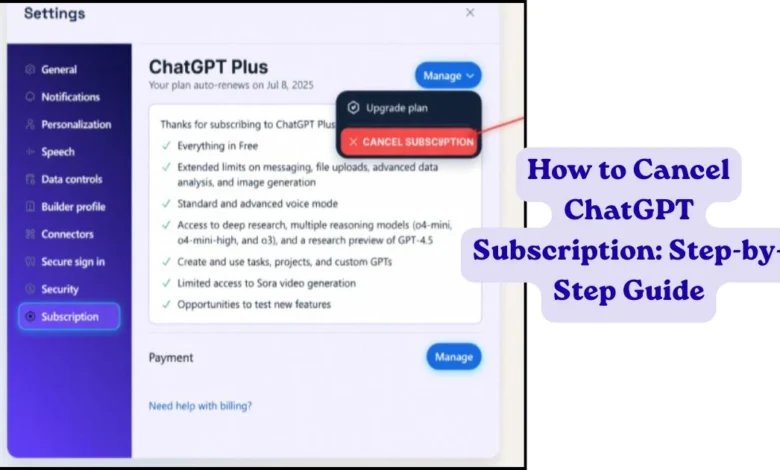
If you want to cancel your ChatGPT subscription but don’t know where to find the option, you’re not alone. Many users have trouble canceling because the steps are different for web, iPhone, and Android.
In this guide, you’ll learn how to cancel your ChatGPT subscription on every platform using simple step-by-step instructions.
Quick Answer
To cancel your ChatGPT subscription, open the platform where you originally subscribed. If you signed up on the ChatGPT website, use My Plan > Manage Subscription. If you subscribed through Apple or Google Play, cancel it from your device’s subscription settings. Your Plus features remain active until the end of your billing period.
1.Before You Cancel Your ChatGPT Subscription
Before canceling your subscription, remember these important points:
- Your ChatGPT Plus features remain available until the current billing period ends.
- Canceling your subscription does not delete your chat history.
- Your account automatically switches to the free version after your subscription expires.
- To avoid another charge, cancel at least 24 hours before your renewal date.
Quick Comparison Table
| Platform | Where to Cancel |
|---|---|
| Web | Settings → My Plan |
| iPhone | Settings → Apple ID → Subscriptions |
| Android | Google Play → Subscriptions |
2. How to Cancel ChatGPT Subscription on Web (Desktop/PC
If you subscribed through the ChatGPT website using a credit or debit card, follow these steps.
Follow These Steps
- Open ChatGPT and sign in.
- Click your profile icon.
- Select Settings.
- Open My Plan.
- Click Manage Subscription.
- Select Cancel Subscription.
- Confirm your cancellation.
3. How to Cancel ChatGPT Plus on iPhone (iOS/Apple)
If you purchased ChatGPT through the App Store, cancel it from your iPhone settings.
Follow these steps:
- Open Settings on your iPhone.
- Tap your Apple ID.
- Select Subscriptions.
- Tap ChatGPT.
- Tap Cancel Subscription.
- Confirm your cancellation.
4. How to Cancel ChatGPT Subscription on Android (Google Play)
If you subscribed through Google Play, follow these steps.
- Open Google Play Store.
- Tap your profile icon.
- Select Payments & subscriptions.
- Tap Subscriptions.
- Select ChatGPT.
- Tap Cancel Subscription.
- Confirm your cancellation.
5. Troubleshooting: Why Can’t I Cancel?
If you can’t find the cancel option, one of these common problems may be the reason.
Problem: “The Cancel Button is Missing”
This usually happens because you are trying to cancel your subscription from the wrong platform. For example, if you subscribed through the Apple App Store, you must cancel it from your iPhone settings instead of the ChatGPT website.
Subscription Purchased on Another Platform
If you subscribed through Apple or Google Play, you cannot cancel from the ChatGPT website. Go back to the device where you originally purchased the subscription.
6.What Happens After You Cancel?
After canceling your subscription, your account switches to the free version when your current billing period ends. Your conversations remain saved, but you’ll lose access to ChatGPT Plus features until you subscribe again.
7. (FAQs)
Q1. Why can’t I cancel my ChatGPT subscription?
Ans: You may be trying to cancel from the wrong platform. Use the same platform where you originally subscribed.
Q2. Will canceling delete my chats?
Ans: No. Your conversations stay in your OpenAI account.
Q3. Do I get a refund after canceling?
Ans: Usually no. Your subscription stays active until the current billing period ends.
Q4. Can I subscribe again later?
Ans: Yes. You can upgrade to ChatGPT Plus again anytime.
Q5. Will my ChatGPT account be deleted?
Ans: No. Only the paid subscription ends. Your account remains active.
Conclusion
If you’re wondering how to cancel your ChatGPT subscription, the process is simple once you know where you subscribed. Whether you purchased ChatGPT through the website, Apple App Store, or Google Play Store, follow the correct steps to avoid future charges.
After canceling, your account automatically switches to the free plan at the end of your current billing period, and your chat history remains available in your OpenAI account. If you need additional billing or subscription help, visit the OpenAI Help Center.
{ “@context”: “https://schema.org”, “@type”: “BlogPosting”, “headline”: “How to Cancel ChatGPT Subscription (Web, iPhone & Android)”, “description”: “Learn how to cancel ChatGPT subscription on web, iPhone, and Android with simple step-by-step instructions. Stop Plus billing without losing your chats.”, “image”: { “@type”: “ImageObject”, “url”: “YOUR_FEATURED_IMAGE_URL” }, “author”: { “@type”: “Person”, “name”: “Flash Topic” }, “publisher”: { “@type”: “Organization”, “name”: “Flash Topic”, “logo”: { “@type”: “ImageObject”, “url”: “YOUR_LOGO_URL” } }, “datePublished”: “2026-07-30”, “dateModified”: “2026-07-30”, “mainEntityOfPage”: { “@type”: “WebPage”, “@id”: “YOUR_ARTICLE_URL” }, “articleSection”: “Technology”, “keywords”: [ “how to cancel ChatGPT subscription”, “cancel ChatGPT Plus”, “ChatGPT subscription cancellation”, “cancel ChatGPT on iPhone”, “cancel ChatGPT on Android” ] } { “@context”: “https://schema.org”, “@type”: “FAQPage”, “mainEntity”: [ { “@type”: “Question”, “name”: “Why can’t I cancel my ChatGPT subscription?”, “acceptedAnswer”: { “@type”: “Answer”, “text”: “You may be trying to cancel from the wrong platform. Use the same platform where you originally subscribed.” } }, { “@type”: “Question”, “name”: “Will canceling delete my chats?”, “acceptedAnswer”: { “@type”: “Answer”, “text”: “No. Your conversations stay in your OpenAI account after canceling your ChatGPT subscription.” } }, { “@type”: “Question”, “name”: “Do I get a refund after canceling ChatGPT?”, “acceptedAnswer”: { “@type”: “Answer”, “text”: “Usually no. Your subscription stays active until the current billing period ends.” } }, { “@type”: “Question”, “name”: “Can I subscribe to ChatGPT Plus again later?”, “acceptedAnswer”: { “@type”: “Answer”, “text”: “Yes. You can upgrade to ChatGPT Plus again anytime if you want to use paid features.” } }, { “@type”: “Question”, “name”: “Will my ChatGPT account be deleted after canceling?”, “acceptedAnswer”: { “@type”: “Answer”, “text”: “No. Only the paid subscription ends. Your ChatGPT account remains active.” } } ] }