August Wi-Fi Smart Lock Review: The Best Smart Security Upgrade for 2026
Do you ever get halfway to work and suddenly wonder, “Did I remember to lock the front door?” It is a terrible feeling. Or maybe you have been in that situation where you are standing on your porch, arms full of heavy grocery bags, and you can’t find your keys in your pocket. These are everyday problems that technology is supposed to fix.
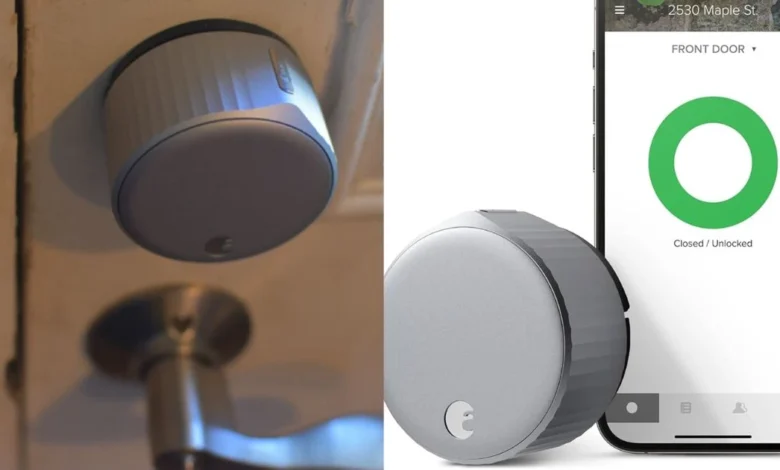
The August Wi-Fi Smart Lock (4th Generation) is a popular gadget designed to solve these exact headaches. It is famous in the tech world because it is a “retrofit” lock. This means you do not have to replace your entire deadbolt or get new keys to use it. But with so many new gadgets coming out, is it still the best choice for your home in 2026? In this long-form review, we will look at every detail to help you decide.
Quick Summary: Should You Buy It?
- Buy it if: You rent your apartment, you want to keep using your current metal keys, or you want a setup that takes less than 10 minutes.
- Skip it if: You hate changing batteries every few months or your Wi-Fi router is on the other side of the house.
- Final Grade: ⭐⭐⭐⭐ (4 out of 5 stars)
1. The Magic of “Retrofit” Design
Most smart locks on the market are “full-replacement” locks. That means you have to take the entire lock off your door and throw it away. For many people, especially in the USA, this is a big problem.
The August Wi-Fi Smart Lock is different. It only replaces the interior “thumb-turn”—the part of the lock you twist with your hand inside the house.
Why this matters for Renters:
If you live in an apartment in a big city like New York or Chicago, your landlord probably won’t let you change the locks. Since this lock only changes the inside, the outside of your door looks exactly the same. Your landlord won’t even know it’s there!
Why this matters for Homeowners:
If you have a beautiful, expensive brass handle on your front door, you probably don’t want a futuristic-looking plastic keypad ruining the look. With this device, you keep your “curb appeal” while getting all the high-tech features.
2. No Extra Hubs Required
In the past, smart locks were a bit of a mess to set up. You usually had to buy a second device called a “bridge” or a “hub” and plug it into a nearby wall outlet. This bridge acted as a middleman between your lock and your Wi-Fi.
The 4th Generation August Wi-Fi Smart Lock finally fixed this. It has the Wi-Fi chip built directly into the metal body of the lock. This is a huge win for two reasons:
- Cleaner Look: No extra white plastic boxes taking up space in your hallway outlets.
- Remote Control: Because it connects directly to your home network, you can check your lock status from your office, the gym, or even while you are on vacation in another country.
3. Smart Features That Change Your Daily Routine
A gadget is only good if it actually makes your life easier. Here are the three features that make the August Wi-Fi Smart Lock stand out in a crowded market:
Auto-Unlock: The “Wow” Factor
This is the feature most people talk about. Using “geofencing” technology, the lock knows when you and your phone are getting close to home. As you walk up the driveway, the lock hears your phone’s signal and clicks open. By the time you reach for the handle, the door is already unlocked. It feels like having a personal doorman.
DoorSense: Peace of Mind
Most smart locks are a bit “dumb.” If you leave your door wide open and hit the “Lock” button on your app, the lock will slide the bolt out into thin air and tell you the door is “Secure.”
August uses a small magnetic sensor called DoorSense. It knows if the door is actually closed flush against the frame. If the door is propped open, the app will send you a notification saying, “Your door is open.”
Virtual Guest Keys
Gone are the days of hiding a spare key under a fake rock or a doormat (which is a very bad idea for security). Through the August app, you can send “Digital Keys” to anyone.
- For the Dog Walker: You can set a key that only works on weekdays from 12:00 PM to 2:00 PM.
- For the Airbnb Guest: You can set a key that starts on Friday at 3:00 PM and expires on Sunday at 11:00 AM.
- For the Family: Give them permanent access so they never have to call you to let them in.
4. Installation: A 10-Minute Science Project
You do not need to be a tech genius or a carpenter to install the August Wi-Fi Smart Lock.
Step 1: Tape the exterior side of your lock so it doesn’t fall out.
Step 2: Unscrew the two screws on the inside of your door and remove the old thumb-turn.
Step 3: Attach the August mounting plate using those same two screws.
Step 4: Slide the lock onto the plate and snap the side wings shut.
Step 5: Open the app and follow the “Calibration” steps.
The calibration is just the lock turning itself left and right to learn how far it needs to move to lock your door perfectly. It is loud, it is fast, and it is very satisfying to watch.
5. Smart Home Integration: Alexa, Google, and Siri
If you have a “Smart Home,” you want all your devices to talk to each other. The August Wi-Fi Smart Lock is one of the best at this.
- Amazon Alexa: You can ask your Echo Dot, “Alexa, is the front door locked?” If it’s not, you can tell her to lock it. (Note: To unlock via voice, you usually have to say a secret 4-digit PIN code for safety).
- Google Assistant: Works exactly like Alexa. It is great for checking the door from your kitchen Nest Hub.
- Apple HomeKit: This is a big deal for iPhone users. You can add the lock to your “Goodnight” routine. When you tell Siri “Goodnight,” she can turn off the lights, lower the thermostat, and lock the front door all at once.
6. The Downside: Let’s Talk About Battery Life
Every piece of tech has a weakness. For the August Wi-Fi Smart Lock, that weakness is the battery.
Because the lock is small and has to maintain a constant Wi-Fi connection, it eats through power quite fast. It uses two CR123 batteries. Unlike AA batteries, you probably don’t have these sitting in a kitchen drawer.
- How long do they last? Usually between 3 to 6 months. If you use the “Auto-Unlock” feature many times a day, they might die sooner.
- The Cost: CR123 batteries can be expensive if you buy them at a local pharmacy. It is much smarter to buy a 10-pack on Amazon to keep in your pantry.
7. Security: Is It Safe from Hackers?
A common worry with smart locks is: “Can someone hack my Wi-Fi and open my door?”
August uses two-layer encryption. This is the same type of security that banks use for their websites. You also have to use “Two-Factor Authentication” (2FA) for your account. This means even if someone steals your password, they can’t log into your lock without a code from your phone.
Also, if you ever lose your phone, you can go to the August website and instantly “kill” the app’s access to your house.
August Lock vs. Traditional Smart Locks
| Feature | August Wi-Fi Lock | Standard Smart Lock (Yale/Schlage) |
| Install Effort | Very Low (10 mins) | High (Needs a drill/full swap) |
| Keep Old Keys? | Yes | No |
| Aesthetic | Hidden inside | Visible keypad outside |
| Battery Life | Average (3-4 Months) | Excellent (1 Year+) |
| Renter Friendly | Yes | No |
Final Verdict: Is It Worth the Money?
The August Wi-Fi Smart Lock is a premium gadget. It isn’t the cheapest lock you can buy, but it is one of the most reliable.
Who is this for?
It is perfect for the busy American family. It is for the person who always has their hands full. It is for the renter who wants to feel safe without breaking their lease rules. It is for the tech lover who wants a “Star Trek” home without rebuilding their front door.
Even though the battery life requires a little bit of maintenance, the sheer convenience of never touching a metal key again is worth every penny. If you want to make your home feel modern, secure, and smart, this is the lock to get.,