How to Clean Laptop Screen Safely (Without Damaging It)
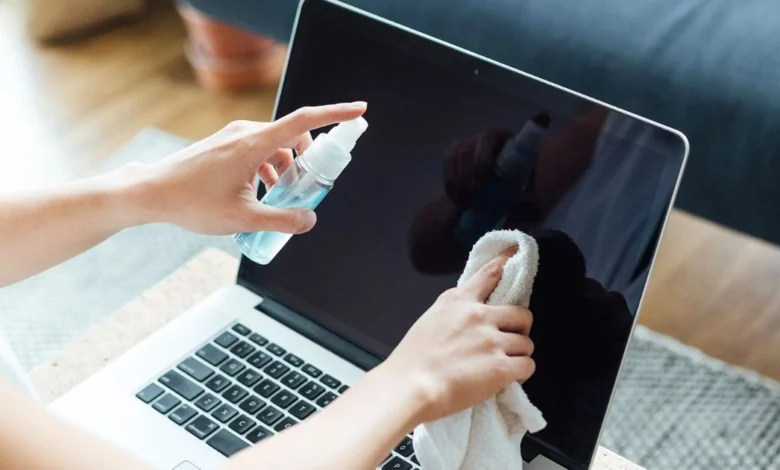
Dust, fingerprints, and smudges can make your laptop screen difficult to see. The safest way to clean a laptop screen is with a clean microfiber cloth and, if needed, a small amount of distilled water. Avoid spraying liquid directly on the display or using household cleaners like Windex, as they can damage the screen coating. This guide explains how to clean your laptop screen safely, remove stubborn marks, and keep it looking like new.Cleaning your laptop screen the right way helps protect its anti-glare coating and prevents scratches.
Why You Should Clean Your Laptop Screen Regularly
A neglected screen does more than just look messy; it can significantly impact your eye comfort and device performance. Dust particles can settle into the bezel, while natural oils from your fingertips may degrade the screen’s surface integrity over time.
Understanding how to clean laptop screen displays correctly ensures that you are effectively lifting debris rather than just spreading it around. Regular maintenance keeps the color accuracy vibrant and the text sharp, which reduces fatigue during long hours of digital work. If you ignore this simple task, the buildup can become much harder to remove without applying dangerous levels of pressure.
What You Should Never Use on a Laptop Screen
Using the incorrect liquid is the most common reason for hardware failure during a routine maintenance session. Ammonia-based cleaners or standard glass sprays are designed for windows and are far too harsh for specialized laptop screen composites.
When you research how to clean laptop screen safely, you will find that distilled water is the safest and most effective universal solvent available. You must avoid using paper towels or tissues, as these wood-based products are often rough enough to cause micro-abrasions on the panel. Sticking to high-quality materials ensures that your cleaning process is restorative and never destructive to the delicate screen finish.
What You’ll Need Before Cleaning
Before you begin the cleaning process, you must gather the specific supplies required to avoid an accidental trip to the repair center. A high-quality, lint-free microfiber cloth is your most critical tool because it traps microscopic dust rather than spreading it across the glass. You should always have distilled water on hand, as common tap water contains minerals that leave unsightly white streaks or mineral deposits.
Knowing how to clean laptop screen surfaces requires careful preparation, so always ensure your device is completely powered down and cool. This prevents any cleaning solution from evaporating too quickly, which is the primary cause of distracting streaks and spots.
Comparing Effective Cleaning Solutions
| Cleaning Material | Safe for Screen | Recommended |
|---|---|---|
| Dry Microfiber Cloth | ✅ Yes | Daily Cleaning |
| Distilled Water | ✅ Yes | Fingerprints |
| Screen Cleaning Solution | ✅ Yes | Heavy Smudges |
| Glass Cleaner (Windex) | ❌ No | Never |
| Paper Towels | ❌ No | Never |
Step-by-Step Instructions: How to Clean Laptop Screen
Step 1: Turn Off Your Laptop
Turn off your laptop completely and unplug the charger before cleaning. This reduces the risk of electrical damage and makes fingerprints easier to see.
Step 2: Disconnect Accessories
Remove the charger, USB devices, or external accessories before you start cleaning. This helps prevent accidental damage.
Step 3: Wipe with a Dry Microfiber Cloth
Use a clean microfiber cloth to gently remove dust and loose particles. Avoid pressing too hard on the screen.
Step 4: Use Distilled Water if Needed
If fingerprints remain, slightly dampen the cloth with distilled water. Never spray water directly onto the display.
Step 5: Dry and Polish the Screen
Use a dry part of the microfiber cloth to remove moisture and leave the screen streak-free.
Techniques for Removing Stubborn Residue and Grime
Sometimes, a simple dry wipe isn’t enough to remove sticky residue or heavy grime from a high-traffic work week. In these specific instances, a diluted mixture of white vinegar and distilled water can effectively break down the proteins in the dirt. This is a vital technique to remember when learning how to clean laptop screen surfaces that haven’t been maintained for several months.
Always apply your chosen mixture to the cloth first to prevent any liquid from dripping into the keyboard or sensitive electronics. This controlled application ensures that your laptop stays completely dry and fully functional throughout the entire cleaning procedure.
Tips to Keep Your Laptop Screen Clean Longer
After you have finished the damp cleaning phase, the final buffing stage is what creates that impressive, factory-fresh appearance. Use a fresh, dry microfiber cloth to remove any remaining moisture or ghosting streaks left behind by the distilled water.
Mastering how to clean laptop screen displays also involves adopting new habits that keep the display cleaner for much longer periods. Try to close your laptop lid when it is not in use to prevent ambient dust from settling on the delicate surface. These small changes in your daily behavior will significantly reduce the frequency of deep cleanings required to maintain clarity.
My Experience
I also noticed that cleaning the screen once a week keeps fingerprints from building up and reduces the need for deep cleaning.
(FAQ’s)
Can I use Windex or glass cleaner on my display?
No, you should never use ammonia-based cleaners because they can permanently strip the protective anti-glare coatings off your screen.
Is it safe to use a paper towel for cleaning?
No, paper towels are made of abrasive wood pulp that can leave permanent micro-scratches on your delicate laptop display.
Should I spray distilled water directly onto the screen?
Never spray liquid directly on the screen as it can seep into the bezel and cause a short circuit in the internal hardware.
Can I clean the screen while the laptop is turned on?
No, you must power off the laptop to see smudges more clearly and to prevent any potential electrical damage during the process.
How often should I perform a deep clean on the display?
You should dry dust your screen once every week and only perform a damp clean when visible smudges or oily fingerprints appear.
Can I use baby wipes on a laptop screen?
No, most baby wipes contain ingredients that may leave residue or damage the screen coating.
Can I use eyeglass cleaner on my laptop screen?
Only if the cleaner is specifically labeled as safe for coated electronic screens.
Can I clean a MacBook screen the same way?
Yes, use a clean microfiber cloth and follow Apple’s recommended cleaning method for best results.
Can alcohol damage laptop screens?
Yes, high-strength alcohol or products not designed for screens can damage the protective coating.
Conclusion
Keeping your laptop screen clean is easy when you use the right tools and methods. A microfiber cloth and a small amount of distilled water are usually all you need. Avoid harsh cleaners, paper towels, and spraying liquid directly onto the display. With regular care, your laptop screen will stay clean, clear, and protected for years.
By following these simple tips, you can keep your laptop screen clean, protect its display, and improve your viewing experience without causing accidental damage.